Labor Cost & Staff Schedule

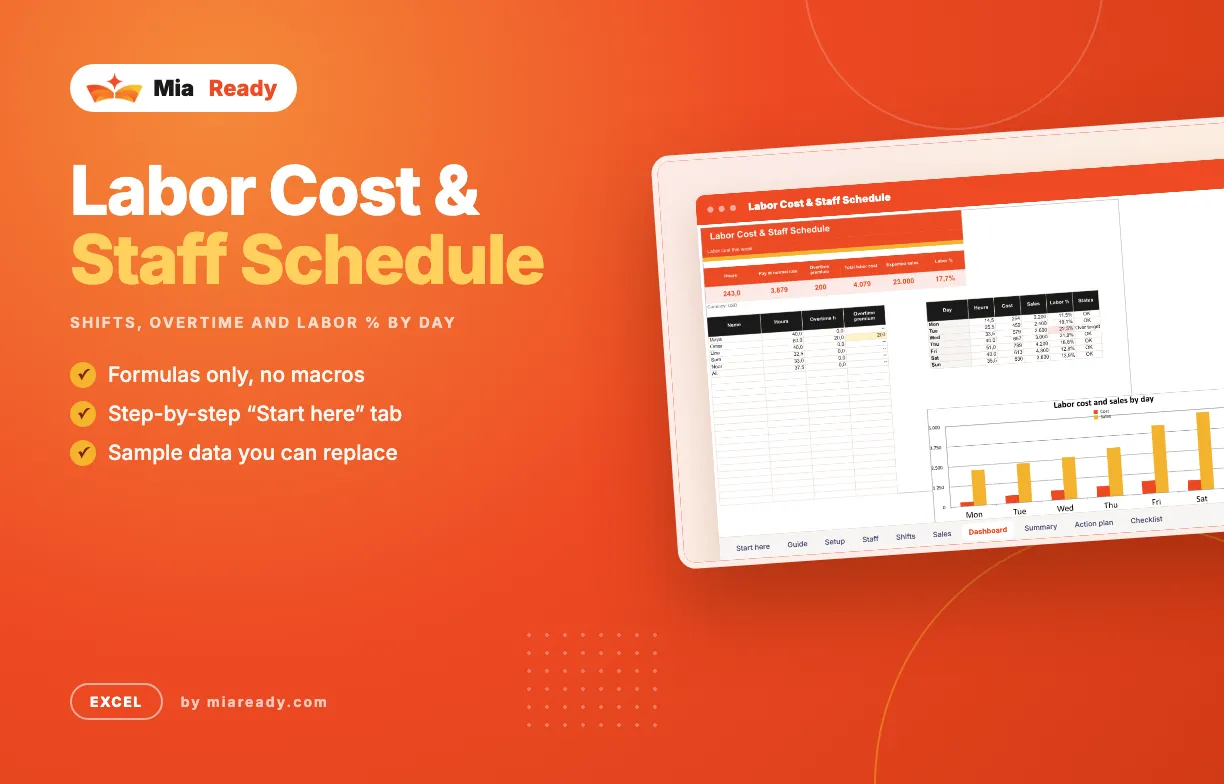
Plan the week's shifts, see hours and pay per person with overtime, and check labor cost as a share of each day's sales before the week starts.

Labor is usually the biggest cost you can still change this week. Put the planned shifts next to the sales you expect each day, and the days where you are over-staffed show up before you pay for them.

What's in the file

  • Start here — step-by-step guide and colour legend
  • Guide — How to read the numbers. Plain explanations of every number, how to read the result and the mistakes to avoid.
  • Setup — Targets and overtime rules. You fill in: Currency, Target labor cost % of sales, Weekly hours before overtime, Overtime pay rate (× normal).
  • Staff — Your team and hourly rates. You fill in: Name, Role, Hourly rate.
  • Shifts — One line per shift this week. You fill in: Name, Day, Start (hour), End (hour), Break (h). Worked out for you: Hours, Hourly rate, Cost.
  • Sales — Expected sales per day. You fill in: Day, Expected sales.
  • Dashboard — Labor cost this week. Shows: Hours, Pay at normal rate, Overtime premium, Total labor cost, Expected sales, Labor %, a chart.
  • Summary — What the numbers say. Shows: Total labor cost, Labor %, Target labor %, Overtime premium.
  • Action plan — What you will change next. Write what you will change, why, who owns it and by when; status shows in colour.
  • Checklist — Weekly rota routine. 4 steps to tick off, with a progress bar.

How to use it

  1. Open Setup: set your target labor %, the weekly hours before overtime and the overtime rate.
  2. List your team with hourly rates in Staff.
  3. Add one line per shift in Shifts (hours as numbers, e.g. 9 and 17.5), and the expected sales per day in Sales.
  4. Check the Dashboard: move hours from days over target to busier days.

What it does

  • Shift list: start, end and break for each person and day
  • Hours, overtime and pay per person for the week
  • Labor cost % per day against your target
  • Overtime premium above your weekly threshold
  • Two files in each language: a blank Template to fill in, and an Example filled with sample data
  • Available in several languages; Arabic files are laid out right-to-left
  • Formulas only, no macros or add-ins
  • Instant download after purchase

Included Files

  • A file in the language you choose
  • Arabic files laid out right-to-left
  • Step-by-step guide
  • Free updates for this version

Works With

  • Microsoft Excel
  • Excel for Mac

Support

Questions about setup? Send us a message from your account page and we reply by email.

Labor Cost & Staff Schedule

The video tutorial for this template is coming soon.

No reviews yet. Reviews appear here after customers rate the template.

Write a review
Your rating
FAQ
  • Which language is the file in?

    You get the file in the language you pick at the top of the site. If a template is not available in that language yet, you get the English file. Arabic files are laid out right-to-left.

  • Do I need macros or add-ins?

    No. The templates use formulas and built-in charts only.

  • Can I change the template?

    Yes. Rename columns, add rows, change colours and add your logo.

  • How do I get the files after paying?

    The download link appears on the order page and in your account right after payment.

Personal License

For you, on your own projects and your own company reports.

Team License

Share the files with up to 10 people in your company.

$35.00

Free

File language: English

Add To Cart
Mia Ready
39 templates in the shop
View All Templates
  • Last updateNov 18, 2026
  • PublishedNov 18, 2026
  • CategoryHospitality
  • File format.xlsx
  • LanguagesEnglish
  • LayoutLeft-to-right; Arabic right-to-left
  • MacrosNone
  • Works WithMicrosoft Excel, Excel for Mac
  • Tags Excel, Hospitality
Like this template?

Found it useful? Recommend it to other marketers and earn 30% of every sale you bring in.

Become an affiliate